Try 163 × 27 % 341 on iPhone Calculator
The result may shock you.
This morning I touched a key I almost never touch — the “%” key on the macOS / iPhone Calculator.
In my entire life, I’ve only pressed it once. Who really needs “0.123 is 12.3%”? 😂
But today something unexpected happened.
A single symbol started behaving like two different operators.
The experiment
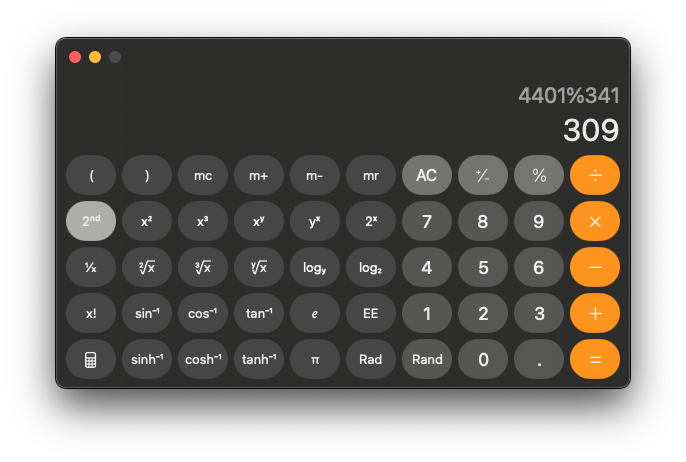
If I compute 163 × 27, then apply “% 341”, I get:
309 — which matches (163 × 27) mod 341.
So far, everything feels consistent.
The surprise
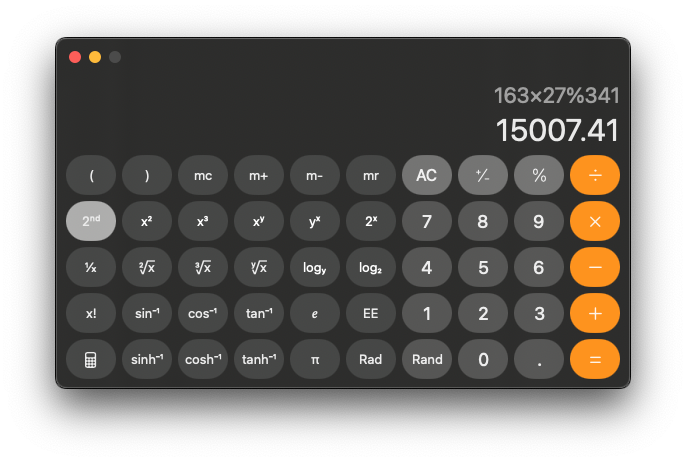
If I type everything inline:
163 × 27 % 341
the Calculator returns:
15,007.41
Wait… what?
What is happening
The Calculator app is interpreting “%” in two different ways depending on context:
- After a completed operation → behaves like a modulo-style operator
- Inline usage → reverts to legacy percentage meaning
Same symbol. Two incompatible interpretations.
The math is fine — the UI is doing context switching.
Visual evidence
Two screenshots showing the difference in behavior:
Reflection
This is a small reminder that symbols we think we understand can quietly change meaning depending on context.
Sometimes confusion is not in the formula — but in the interface.
11/28/2025