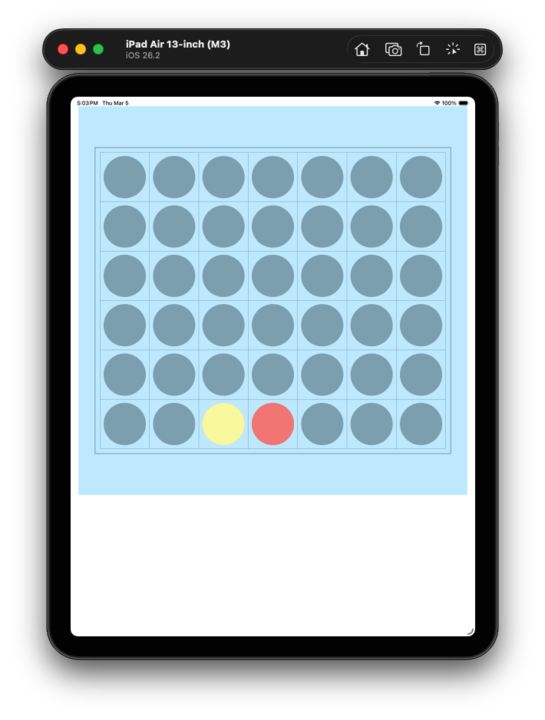
Designing a Flexible Drawing Tool — Nicole’s Connect 4 Progress
At this stage, her board was already rendered: a 7 × 6 grid made of 42 grey circles on the iPad simulator.
The next challenge naturally appeared:
How do we draw the actual game pieces?
Instead of hard-coding separate drawing logic, Nicole first created two functions — one for red pieces and one for yellow pieces.
But then we stopped and reframed the problem:
Could this be a single flexible drawing tool instead of multiple fixed ones?
Nicole paused and explored the idea:
“Maybe… if we pass something in?”
That “maybe” became the turning point.
We introduced a parameter like colorName, and used conditional logic to decide how to draw:
if colorName == "red" { ... } else if colorName == "yellow" { ... }
Then came a second refinement — more important than the first.
I asked:
“The .fill() step is the same in every case. Should it really be repeated inside each branch?”
She immediately saw the pattern.
Instead of duplicating drawing logic, we extracted the variable part only:
decide the color inside the condition apply the drawing once at the end
So the function evolved into:
func drawCircle(colorName: String, col: Int, row: Int) { var color: UIColor = .systemBlue
if colorName == "red" { color = UIColor(...) } else if colorName == "yellow" { color = UIColor(...) } else if colorName == "original" { color = UIColor(...) }
color.setFill() UIBezierPath(...).fill() }
Now a single function can render three different meanings:
the original empty board red pieces yellow pieces
One tool. Three roles.
This is one of those early programming moments where a student starts to see a deeper idea:
good tools are not specific — they are reusable.
Nicole is no longer just drawing a Connect 4 board. She is beginning to design abstractions.
And the board is starting to feel alive.
🌱 iOS Dream Team Small circles. Big thinkers.