Living Museum of Learning
The Game That Learned to Ask for a New Game
A few months ago, Ivy had never written a line of code.
This week, she built her own version of the 24 Game on iOS inside Xcode using Swift.
Unlike her earlier projects—Chinese chess and Connect 4, where she carefully drew every grid and board—this time she entered a different kind of construction space: interface-first development.
Instead of drawing, she was now connecting.
Control-dragging buttons. Wiring labels to code. Linking UI elements directly into logic through @IBAction.
At the beginning, she started with a clean idea:
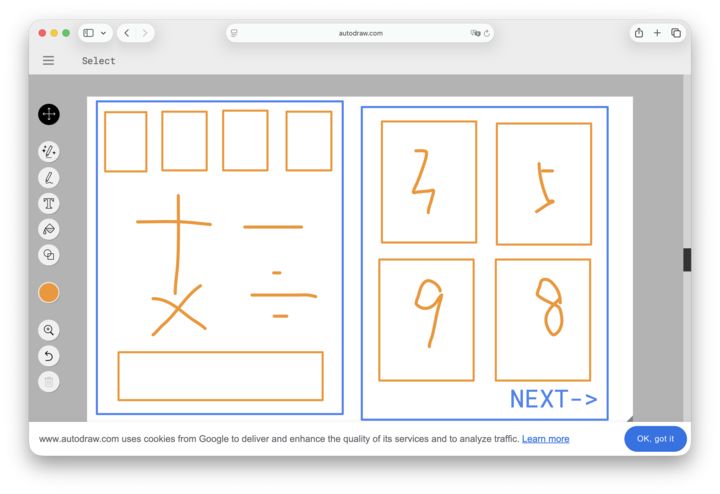
• One text box for input • Four operation buttons: + − × ÷
Simple enough.
Then came the first real design question:
What is the minimum version of a playable game?
That question changed the direction of her design.
Because once the app worked, something important was missing.
How does a player start again?
That question did not come from syntax. It came from usage.
So she redesigned the interface and added a small but essential element:
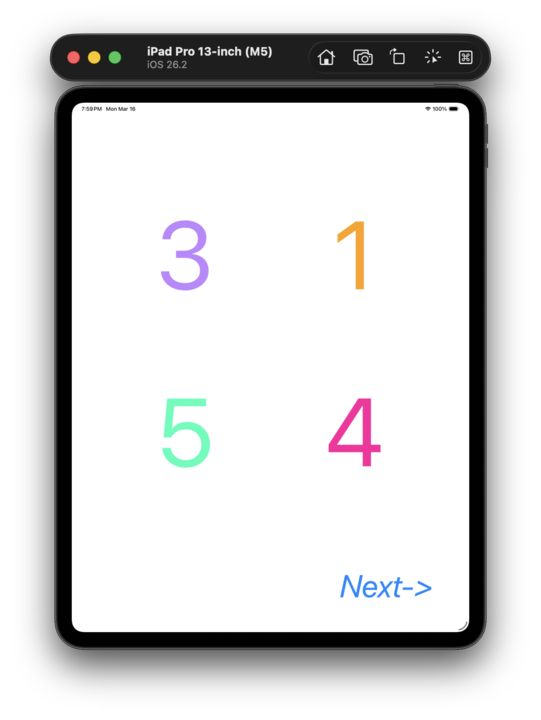
A subtle “Next →” button, placed at the bottom-right in italics.
Along the way, the system pushed back:
• Labels showing “…” instead of numbers → layout constraint issue • Random values not updating correctly → needed separate generators • Xcode navigation friction → even opening multiple panels was a learning curve
But the most consistent thing was this:
She never broke the control-drag connections.
Every UI element stayed precisely wired to code.
In the end, her core logic was simple and clean:
@IBAction func nextGame(_ sender: Any) { let random: Int = Int.random(in: 1...10) let random2: Int = Int.random(in: 1...10) let random3: Int = Int.random(in: 1...10) let random4: Int = Int.random(in: 1...10)
number1Label.text = "\(random)" number2Label.text = "\(random2)" number3Label.text = "\(random3)" number4Label.text = "\(random4)" }
Four colored labels—brown, purple, green, red—quietly turning randomness into a playable puzzle.
When the app was ready, the first test was simple:
“Let’s play some games.”
Round 1—she won in seconds. Round 2—the same.
Then we stopped.
Because this was no longer just a math game.
It was a system she had designed, tested, and improved.
We’ll return to the earlier version later—to verify expressions and close the loop properly.
But something had already shifted.
She was no longer just solving problems inside a game.
She was starting to design the game itself.
Not by memorizing syntax, but by learning how users, interfaces, and logic fit together.
🌱 iOS Dream Team Small circles. Big thinkers.